
A HyperTTS user contacted us with the following question:
I am currently using HyperTTS with Anki to create flashcards for learning English vocabulary. Each flashcard includes the pronunciation of the word to help reinforce memory.
However, I have encountered a challenge with words that share the same spelling but have different pronunciations depending on their part of speech or meaning. For example:
Could you please advise on how I can configure HyperTTS so that I can select or generate the correct pronunciation for each specific usage when creating flashcards?
If you generate audio for a single word, for example "live", obviously the TTS engine has no way of knowing which pronunciation you are looking for:
A number of text to speech services support something called SSML (Speech Synthesis Markup Language):
Using SSML, you can customize the speech output to get a very precise result. This is apparently very important for Japanese: https://aws.amazon.com/blogs/machine-learning/optimizing-japanese-text-to-speech-with-amazon-polly/
In this particular case, we created a new field in the Note Type called Word Alternate Pronunciation.

The content of the field is <phoneme alphabet="ipa" ph="/lɪv/">live</phoneme>, this tells Amazon TTS to pronunce "live" as in "to live". I asked ChatGPT to give me the IPA pronunciation for "live" as in "to live" and it gave me "/lɪv/". Then, we created an HyperTTS preset with the following settings:
Source Field: Word Alternate Pronunciation

Voice Selection: pick an Amazon Neural voice.
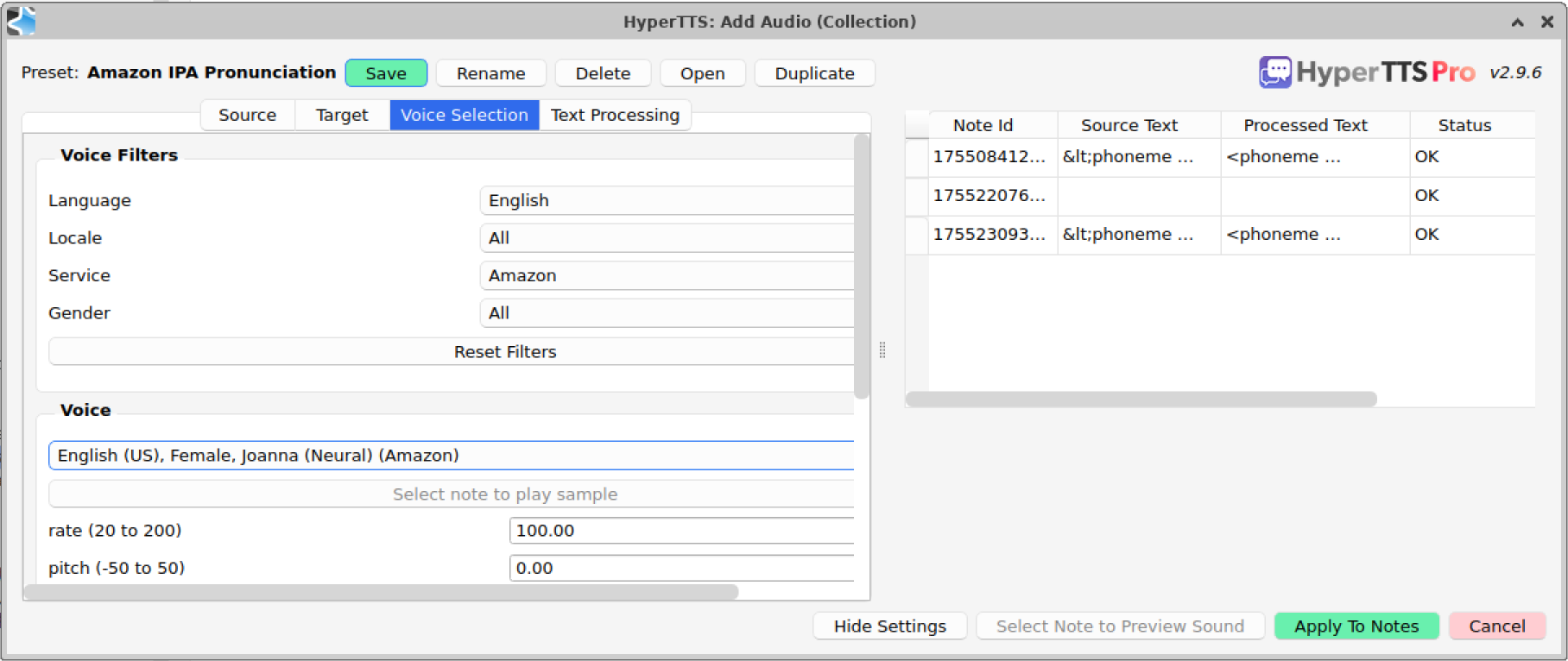
Finally, very important: in the Text Processing tab, make sure to uncheck Convert SSML characters. By default, HyperTTS thinks it's HTML code which should be removed. In this case, we want the SSML tags to be intact when they are sent to the TTS engine. You can see this in the Source Text column on the right, it shows the SSML characters are modified (<), while as the Processed Text column on the right shows the correct, intact SSML string. You can select the row, and click Preview, you should hear the correct pronunciation.

Make sure to save this preset if you are satisfied with the output, and you can generate audio. Now in case it wasn't obvious, this method requires you to manually provide as input the IPA pronunciation, so it's time consuming. But in exchange, you get a fully customized pronunciation output. That's it for this tip, SSML is very powerful, please reach out to us if you have any further questions!
February 5, 2026
Can't find what you're looking for ? Please email help@mail.vocab.ai or chat with us and I'll try to help you out as soon as possible.